Desktop
Local-first storage, offline day-to-day use, and a permanent one-time licence for Windows or Linux.
$129 one time · current Desktop offer independently governed
For independent consultants
RetainerMeter helps independent consultants track retainer hours, live burn, additional billable hours, and professional invoices. Choose local-first Desktop or browser-based Web.
Desktop: 30-day trial, local-first, no cloud account. Web: 30-day full trial, no card required, separate cloud storage, no sync.
Sign in or start a Web trial from this device. The full work-entry workflow currently requires a desktop browser. Invoice access is available on mobile.
Prefer local-first Desktop? Get the desktop link.
Want RetainerMeter updates by email? Occasional notes about major releases and important product updates.
Choose your edition
Local-first storage, offline day-to-day use, and a permanent one-time licence for Windows or Linux.
$129 one time · current Desktop offer independently governed
No installation, a separate cloud workspace, and access from your supported desktop browsers. Single-user and no sync with Desktop.
$15/month or $150/year, tax-inclusive · 30-day full trial
The problem
You log the week's hours and discover that a client passed the allowance several days ago. The conversation about scope and additional work now happens after the problem has developed.
You compare the time log with a rate table, calculate additional hours, and rebuild the invoice each month. The work takes time and creates more places for errors to enter.
A spreadsheet without versioning, a backup routine, or an audit trail can put years of billing history at risk.
How it works
Step 01
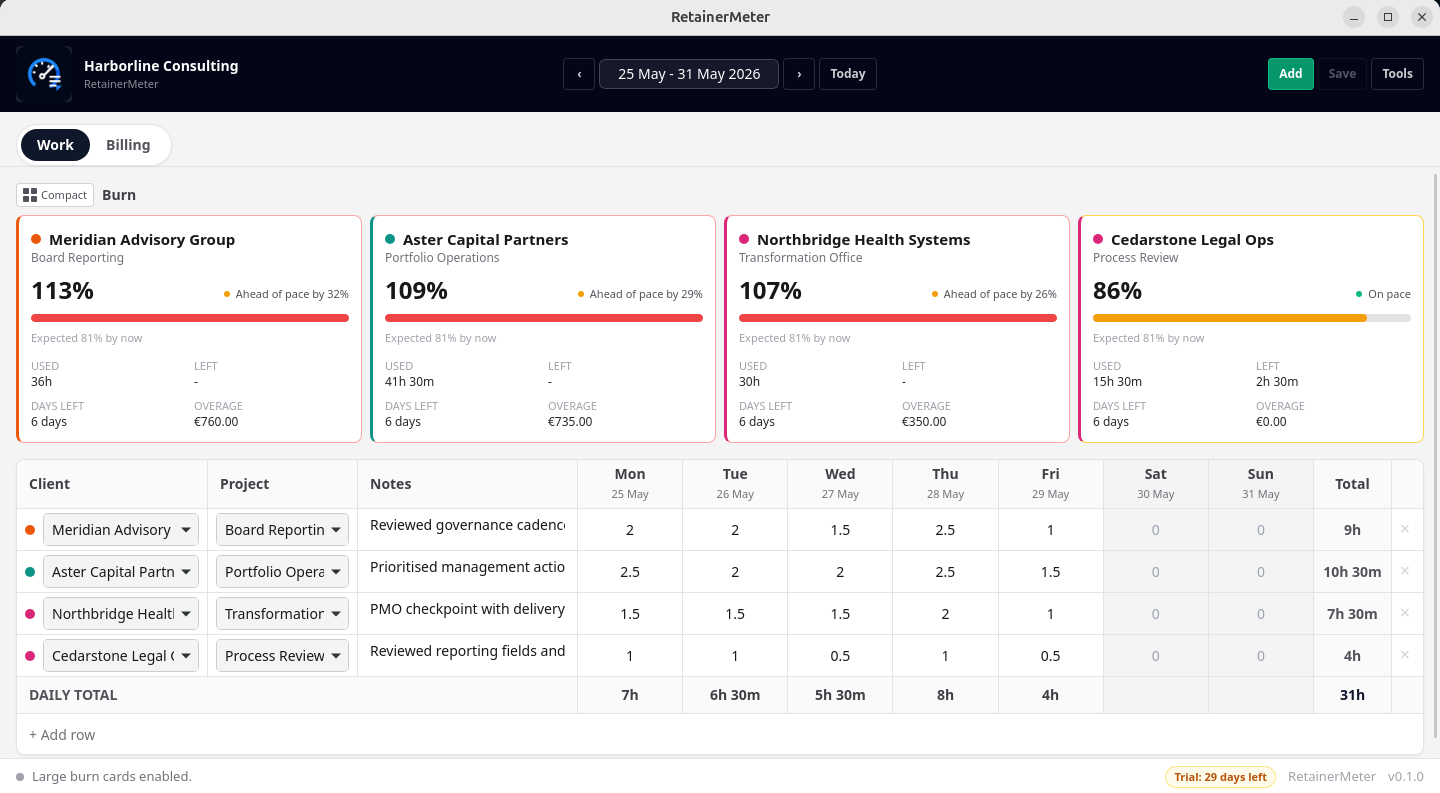
A keyboard-friendly weekly grid lets you tab through days and clients at full speed. Autosave reduces the risk of losing edits. Copy last week's structure from the toolbar at the start of each week.
Step 02
Live burn cards update as you type. Each card shows hours used, hours remaining, risk of exceeding the retainer, and whether you're ahead or behind the expected pace for the month, so you can act before it becomes a problem.
Step 03
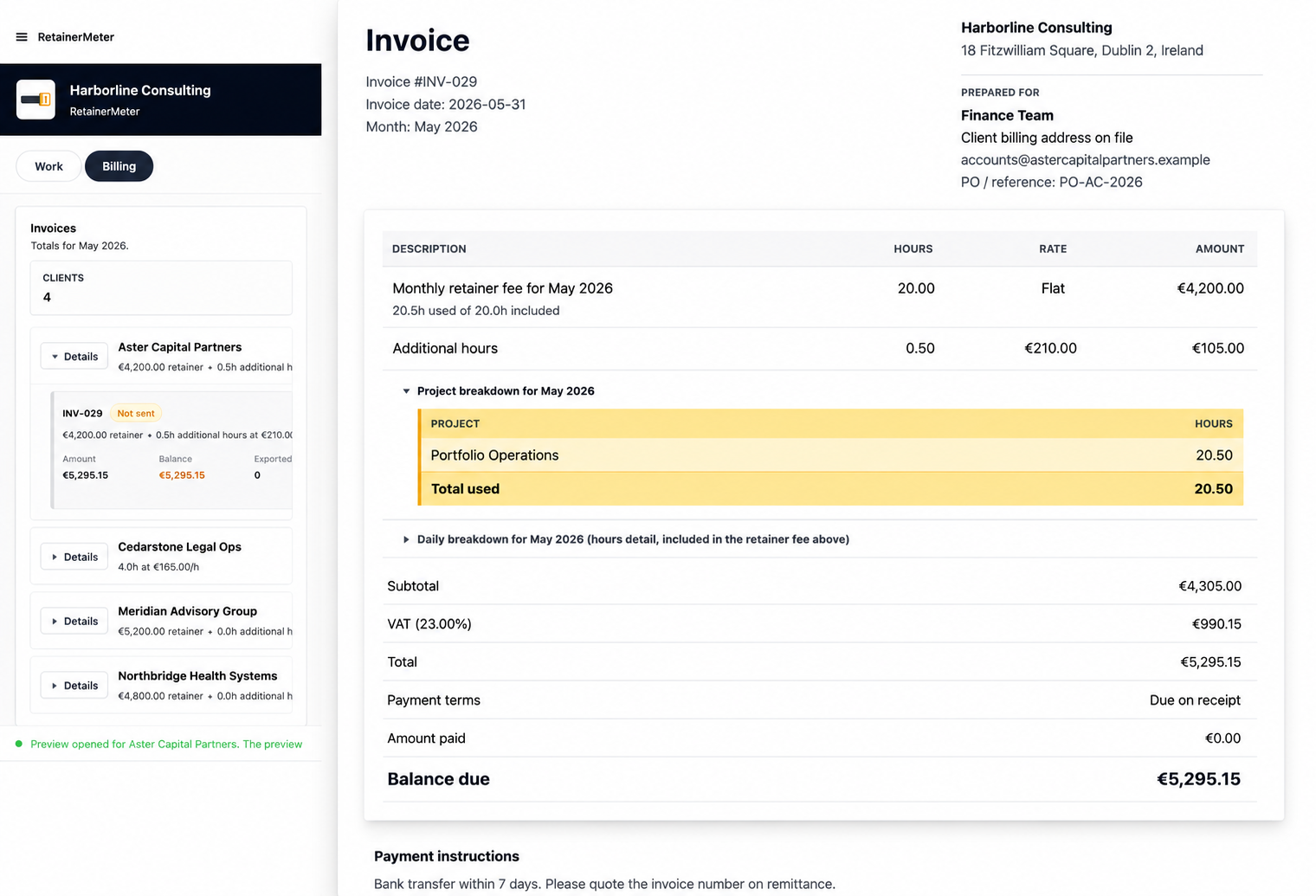
RetainerMeter generates a branded PDF invoice with your logo, line items, notes, retainer fee, additional hours, and tax. HTML export is still there when you want an editable archive copy. Mark invoices as sent, record payment, and track outstanding balances in the billing panel.
See the core flow in about two minutes: consultant setup, client retainers, weekly hours, burn tracking, and invoice preview.
Billing proof
Open the billing view, preview the invoice, and confirm retainers, additional hours, tax, payment status, and export history before sending anything to a client.
Features
Burn cards update in real time as you enter hours. Pace indicators show whether you're ahead or behind, while Retainer Forecast projects the likely month-end hours and financial effect once there is enough current-month activity.
Desktop and Web support four billing models: hourly, flat monthly retainer, retainer with additional billable hours, and day-based retainer with configurable hours per day. RetainerMeter builds the corresponding invoice structure from the terms you enter.
Mark an invoice as sent and it locks. Correcting a prior week's hours won't silently change an amount you've already invoiced. Export counts and timestamps help you track what was generated.
Tab, Enter, and arrow keys navigate the weekly grid. Undo and redo are built in. Copy last week from the toolbar when you want a fast starting point.
Desktop keeps working data on your machine. Web uses a separate cloud workspace. The editions do not synchronize. A manual backup transfer replaces the destination and does not merge the two datasets.
Set your invoice currency, tax label, and tax rate per your own market. USD is the default in the demo, but EUR, GBP, CAD, AUD, and other common billing currencies are supported.
Ideal for
IT, software, business, and marketing consultants who need to see retainer usage before the month ends.
Fractional CFOs, COOs, CMOs, CTOs, and independent advisers balancing recurring access, delivery, capacity, and additional work.
Designers, developers, coaches, and contractors who bill business clients through a monthly allowance or recurring fee.
Small practices where one person owns the client time record, monthly retainer review, and invoicing workflow.
Independent finance professionals who sell recurring advisory work and need a clear operational billing record.
Professionals who prefer ordinary client time and invoice data to remain on their own Windows or Linux computer.
Questions consultants ask
Retainer tracking software helps consultants record time against each client retainer, compare hours used with hours included, and see whether a retainer is on pace before the month ends.
Yes. Desktop and Web support hourly work, flat monthly retainers, retainers with additional billable hours, and day-based retainers with configurable hours per day. RetainerMeter calculates hours above the allowance and includes them on the invoice.
Yes. The billing view previews professional invoices with retainer fees, additional hours, tax, payment terms, and balance due. You can export PDF invoices and HTML archive copies.
Desktop is local-first and works offline for normal tracking and invoicing. Web is a separate browser-based cloud edition with a 30-day full trial and no card required. The editions do not synchronize.
Yes. RetainerMeter supports unlimited clients and retainers. Each client can have its own billing model, monthly fee, included hours, additional-hours rate, and time entries.
RetainerMeter compares recorded hours with the client's included hours and the point reached in the month. Burn cards show hours used, hours remaining, percentage consumed, and whether usage is ahead of or behind the expected pace.
RetainerMeter can include a manually entered rollover-hours amount in burn and invoice calculations. It does not decide or carry hours forward automatically. Enter rollover according to the terms agreed with the client.
Exported invoice records stay locked. Valid late-entered work can appear in a separate additional-hours invoice so the invoice already provided to the client is not silently rewritten.
Resources
How monthly burn, allowances, additional hours, and billing fit together in a dedicated workflow.
Product guide →From approved retainer hours to invoice preview, PDF export, and a protected billing record.
Billing guide →A fair comparison of flexibility, live burn, invoice preparation, collaboration, and local control.
Compare workflows →A practical checklist for retainer fees, additional hours, final review, and invoice locking.
Read article →Warn clients before the allowance runs out and avoid an invoice-day surprise.
Read article →Browse the growing library of practical guides for consultants who bill recurring client work.
Visit resources →Tell me how you bill: prepaid hours, rollover rules, approval steps, quarterly retainers, project splits, or something else that does not fit the current models.
Desktop data stays on your machine. The Desktop edition stores app data in local JSON files. There is no cloud account to create for normal Desktop use. You remain responsible for protecting your device and backups.
Daily work stays offline. No internet connection is needed to log hours, view burn cards, or generate invoices. Update checks and downloads need the internet.
Buy once, keep it. The one-time licence keeps your purchased version of RetainerMeter working after the trial. Price includes applicable VAT/sales tax where required. Optional maintenance covers ongoing fixes, minor improvements, compatibility updates, and reasonable support for your licensed version.
Pricing
Public prices are USD and include applicable customer tax. Both editions can be tried before purchase.
RetainerMeter is available now as a signed Windows installer and a Linux AppImage. No email is required to download.
RetainerMeter installs on Windows and Linux. Send yourself the desktop link and open it from your computer.
Purchase and activation happen inside the app when you are ready.
Need Linux? Download the Linux AppImage.
Windows installer · 30-day trial · no credit card.
Public downloads are live for the signed release builds. What’s new in Desktop v1.0.2